Translation Memory
Translators waste time re-translating the same phrase. A button label, an error message, a marketing line: the same source text appears across keys, projects, and products, but each translation is rewritten from scratch and worded slightly differently each time.
Translation memory (TM) searches for similar texts your team has translated before and suggests them in the editor. Matches come from the project's own translations and from any shared memory connected to the project, so a phrase translated once becomes available everywhere it appears again.
Translation memory only works on a project's default branch. Translations on other branches are not written to the memory, and matches from non-default-branch keys are not surfaced as suggestions or used by auto-translate. See Branching for the general rule on what branch-scoped data is and isn't shared across branches.
To create shared memories, import them, and share them across projects at the organization level, see Manage translation memories.
Translation memory matches
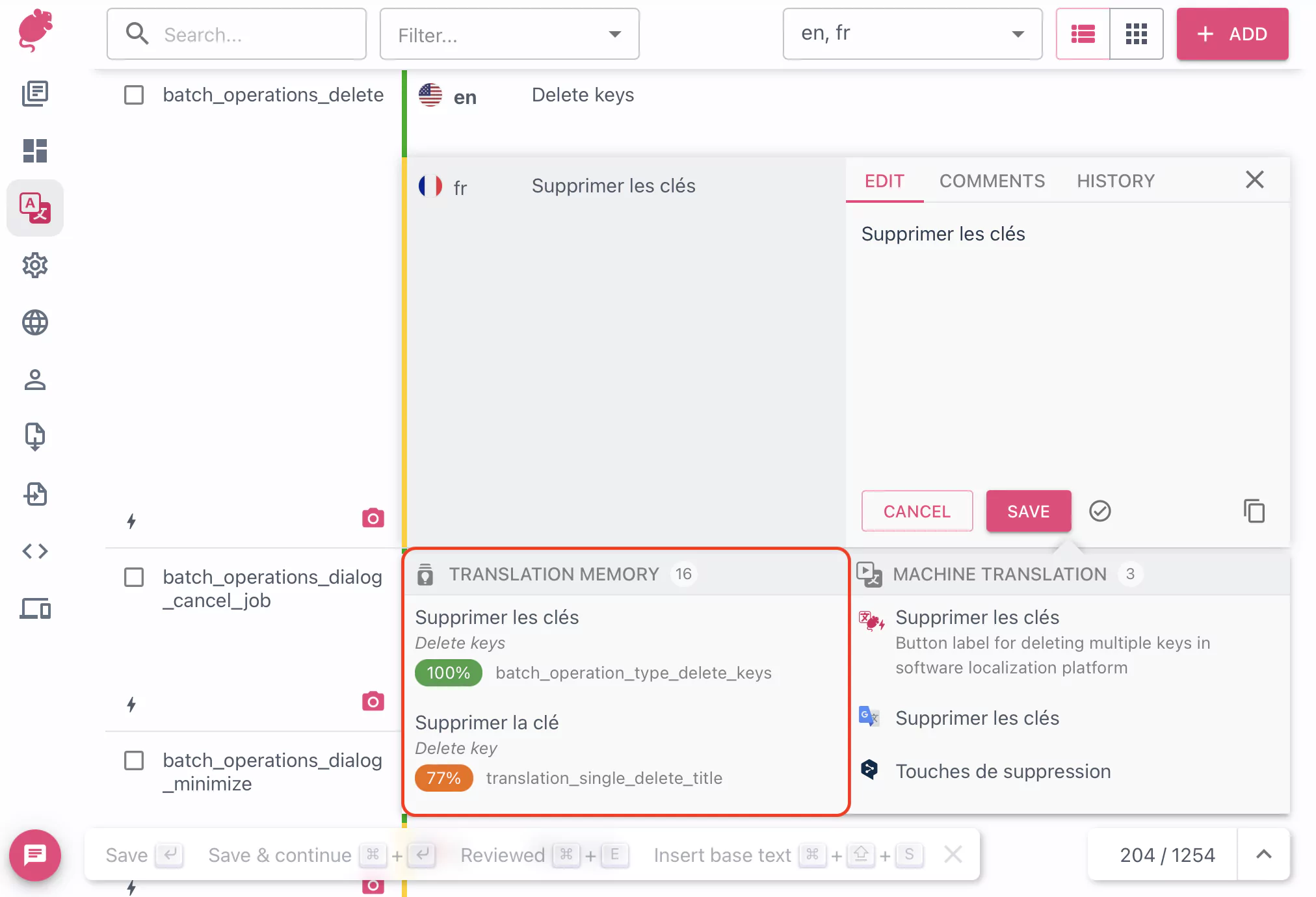
Matches appear in the editor as a ranked list. Matches with less than 50% raw similarity (before any penalty is applied) are not shown — so the score pill, which displays the post-penalty score, can sometimes be below 50%.
For each TM match, the panel shows:
- The translation in the target language
- The source text it was translated from
- A match-score pill, coloured by tier (high / medium / low) so strong matches stand out
- The translation memory name, the source key, and how long ago the entry was last updated
To insert a match into the editor, click the suggestion.
How matches are scored
Each match is scored by similarity between its source text and the text being translated. Scores can be lowered by a penalty an organization owner has configured on a shared memory. When two matches end up with the same final score, the memory's priority in the project's translation memory list breaks the tie. You can reorder memories from Project settings → Advanced → Translation memory.
Where matches come from
Every project has a project-only memory that mirrors its own translations. Beyond that, an organization owner or maintainer can connect one or more shared memories to the project, each with its own read or write access and penalty. The editor merges results from every connected memory and shows the strongest matches first.
See Manage translation memories for how to create shared memories, import TMX files, and assign memories to projects.
Auto-translate from memory
The same memories that drive the suggestion panel can also fill empty translations automatically, either as you save (with auto-translate enabled in the project) or in bulk via the pre-translate batch job. The two features look at the same memories but follow different rules.
| Feature | Triggered by | What it looks at | Threshold |
|---|---|---|---|
| Editor suggestion panel | Opening or focusing a translation cell | Trigram similarity with penalty subtracted | Raw similarity ≥ 50% (penalty does not affect inclusion, only the displayed score) |
| Auto-translate / pre-translate by TM | Saving with auto-translate on, or running the pre-translate batch job | Exact source-text match | Exact equality and the memory carries no penalty for the receiving project |
A memory marked with any penalty (its default or a per-project override) still shows up as suggestions, but auto-translate is skipped.
One other case the panel can show but auto-translate skips: a draft target while the memory is in Only accept reviewed translations mode. Auto-translate also follows the reviewed-only rule.
FAQ
What's the difference between translation memory and machine translation?
Translation memory stores human translations your team has already done, so every match is a real translation of a real source string written by a real translator. Machine translation generates a fresh translation from a model (DeepL, Google, OpenAI, Tolgee's own AI providers, and others) every time it's called. The editor shows both, with TM matches ranked first because they reflect your team's wording. See Machine translation for how to configure MT providers.
Why aren't I seeing matches from a memory in the editor?
A memory match only appears when several conditions line up. Check, in order:
- The project has read access to the memory in
Project settings→Advanced→Translation memory. - The memory's base language matches the project's base language.
- The source text of the key being translated has above 50% similarity with at least one entry in the memory. Matches below 50% are not shown.
- The key is on the project's default branch. Translation memory does not work on other branches.
- For shared memories, the memory actually has entries. Sync from a project only happens when the project has write access AND a translator has saved a translation there.
Why does the suggestion panel show a match that auto-translate didn't use?
Auto-translate is stricter than the suggestion panel. It only fires when the source text is an exact match (100% similarity) and the memory carries no penalty for the receiving project. The suggestion panel shows everything down to 50% similarity, with penalties applied to the score. See Auto-translate from memory for the full rule.
Does the translation memory update in real time as my team translates?
Yes. As soon as a translator saves a translation in a project with write access to a memory, that entry becomes a candidate match for every other project that has read access to the same memory. There is no indexing delay or rebuild step.